ACTIVE BETA
Worldkiln (formerly AeoEngine) is in active beta development.
Public releases are available for testing and experimentation. Features, APIs, project formats, and behavior may change between releases.
Current public feature baseline: 0.7.5
Features marked UNRELEASED / TESTING are part of active 0.8.x development and may not be available in the current public build.
Build a voxel world, make it playable, and turn it into a standalone game.
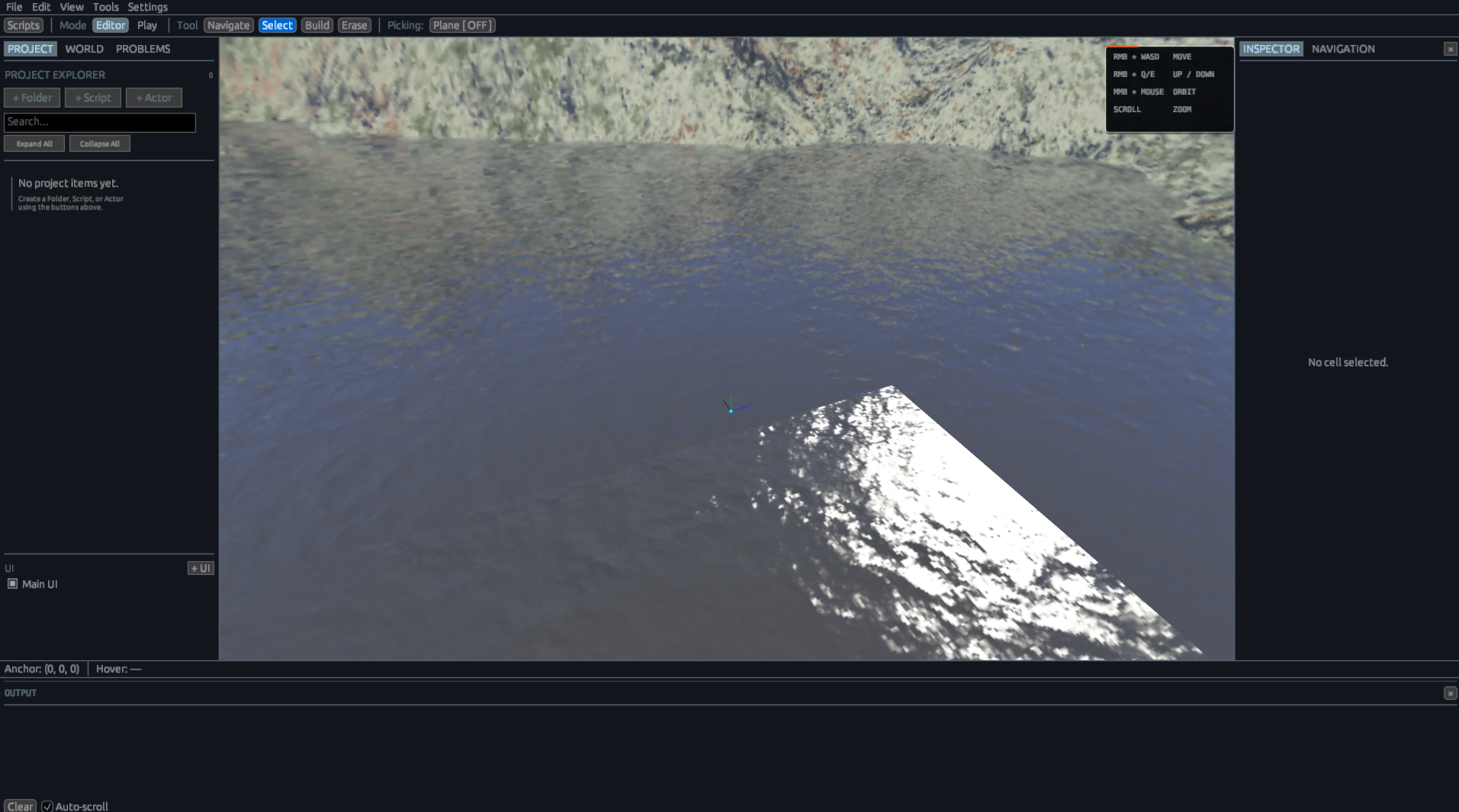
Worldkiln is a Rust/OpenGL game engine and editor for building voxel worlds, creating gameplay with Actors and AeoScript, testing projects in Play mode, and building standalone games.
Download Worldkiln · Worldkiln · Documentation · Getting Started
Features
Available in the public build
- Voxel world editing — build, erase, paint, select, move, copy, paste, and organize worlds.
- Actors — add characters, props, interactive objects, and other packaged game objects with transforms, physics, Attributes, and scripts.
- AeoScript — create gameplay with input, events, UI, audio, animation, attachments, Modules, and runtime game objects.
- UI — build game interfaces with Panels, Text, Buttons, anchors, script keys, and responsive positioning.
- Physics — gravity, collision, moving objects, Characters, contact events, and Play-mode simulation.
- Animation — character animation, layered actions, and attachment points.
- Attachments — attach runtime objects to named Character rig points and return them to the World when detached.
- Audio — import WAV files, place Audio Emitters, and control sounds through AeoScript.
- Play mode — run and test the game directly inside the editor.
- Project assets — manage textures, audio, Character Packages, scripts, UI, and other project files.
- Standalone games — package projects into games that can run separately from the editor.
UNRELEASED / TESTING — 0.8.x development
- Navigation — voxel-derived walkable space, pathfinding, Actor navigation, completion/failure events, and navigation diagnostics.
- Persistent save state — project-specific Number, Bool, and String gameplay values through AeoScript.
- Expanded UI authoring — preview resolutions, snapping, hierarchy reparenting, safe-area guides, typography, validation, presets, and expanded Undo/Redo.
- Expanded Actor authoring — rotation, scale, collider size, collider offset, and package-derived collision dimensions.
- Actor collision expansion — solid authored Actors can physically block and ground Characters.
- Expanded runtime diagnostics — AeoScript errors can identify the active script, function, and source line.
- Worldkiln technical identity migration — executable, package, installation, shortcuts, and supporting application identity are moving fully from AeoEngine to Worldkiln.
- Hearthvale integration work — larger gameplay flows exercising quests, gathering, processing, UI, save state, Actors, Modules, equipment, and progression.
Install
Worldkiln currently supports Windows 10 and 11.
Download the current public build from the Worldkiln download page or from the repository's Releases page.
Current public installation
Worldkiln installs its application files and project data under the Aeowun application directory.
Projects are stored under UserData/ by default.
UNRELEASED / TESTING — 0.8.x installation
The current 0.8.x development installation contract uses:
%LOCALAPPDATA%\Aeowun\
├── .assets\
├── UserData\
├── Worldkiln.exe
└── LICENSE
The development installer can:
- Install the canonical
Worldkiln.exe. - Create a Worldkiln Desktop shortcut.
- Restore missing application files.
- Preserve existing project and asset content.
- Prompt to launch Worldkiln when installation completes.
- Display installer failures directly in the installer UI.
Project Structure
A typical project contains:
MyProject/
├── world.dat
├── scripts/
├── playerscripts/
└── .assets/
world.datstores the project World and its authored objects.scripts/contains standalone and reusable AeoScript Modules.playerscripts/contains scripts associated with the Player..assets/contains textures, audio, packages, UI, and other project assets.
UNRELEASED / TESTING — Save data
0.8.x gameplay save data is stored separately from the authored project.
Save data is not stored inside:
world.dat
project.json
scripts/
the authored project directory
World
The World is the authored voxel environment.
Worldkiln supports:
- Block construction and erasing.
- Multi-selection.
- Copy and paste.
- Selection dragging.
- Multiple build planes.
- Surface-aware building.
- Block colors and textures.
- Lights.
- Audio Emitters.
- Spawn Points.
- Sky environments.
- Undo and Redo.
- Large chunked voxel Worlds.
Changes made through ordinary gameplay during Play mode do not overwrite the authored World.
Actors
Actors are authored game objects that exist alongside the voxel World.
They can represent:
- Characters.
- NPCs.
- Props.
- Weapons.
- Tools.
- Items.
- Switches.
- Interactive objects.
- Other packaged game objects.
Actors can have their own:
- Identity.
- Position.
- Visibility.
- Enabled state.
- Package.
- Physics configuration.
- Attributes.
- AeoScript Modules.
During Play mode, authored Actors become runtime Entities.
Character Packages can additionally provide Character movement, animation, rigging, and other Character capabilities.
Actors are separate from voxel Cells.
UNRELEASED / TESTING — Expanded Actor authoring
0.8.x development adds:
- Authored rotation.
- Authored scale.
- Collider size.
- Collider offset.
- Automatic package-derived collider dimensions.
- Solid Actor-to-Character collision.
- Character grounding on solid Actors.
- Improved collision alignment between rendered Actors and their runtime physics representation.
AeoScript
AeoScript is the gameplay scripting language built for Worldkiln.
debug.log("Game loaded")

gold: number = 0

on on_gold(amount) {
    gold += amount
}
AeoScript supports:
- Variables and constants.
- Functions.
- Events.
- Closures.
wait().- Reusable Modules.
- Actor-attached Modules.
- Input.
- Cells, Actors, and Entities.
- UI.
- Audio.
- Animation.
- Attachments.
- Collision events.
- Player and camera control.
- Creating and removing runtime game objects.
Scripts can run as standalone gameplay systems or be attached to Actors and other supported objects.
Reusable Modules can maintain runtime state, accept arguments, return values, call other Modules, and suspend through wait().
AeoScript Documentation · Developer Reference
UNRELEASED / TESTING — AeoScript runtime improvements
0.8.x development adds or expands:
- Actor navigation.
- Persistent save state.
- More detailed runtime error locations.
- Improved nested Module ownership and execution.
- Improved runtime UI property validation.
- Additional Module and object-state reliability fixes.
UI
Worldkiln includes UI authoring for game interfaces.
UI elements include:
- Panels.
- Text.
- Buttons.
UI controls can use responsive anchors and can be accessed from AeoScript using script keys.
const health_text = ui.find("health_text")
Scripts can also create Panels, Text, and Buttons during Play mode.
UNRELEASED / TESTING — Expanded UI Authoring
0.8.x development expands the authoring workspace with:
- Reorganized Inspector sections.
- Preview resolutions:
1280x7201600x9001920x1080- custom dimensions
- 95% and 90% safe-area guides.
- Selection bounds.
- Resize handles.
- Anchor indicators.
- Parent-bound visualization.
- Center, edge, and sibling snapping.
- Visible snap guides.
- Hierarchy drag-and-drop reparenting.
- Root reparenting.
- Recovery access for invalid or unattached nodes.
- Expanded Undo/Redo.
- Duplicate, rename, delete, bring-forward, and send-backward actions.
- Dialogue Panel, Top Bar, Quest Panel, Satchel Panel, and Center Prompt presets.
- Inline validation.
- Linked and independent stretch margins.
0.8.x also adds unified Text and Button typography:
- Font size.
- Horizontal alignment.
- Vertical alignment.
- Wrapping.
- Padding.
- Line spacing.
UI authoring operations use the selected logical preview resolution instead of depending on the current editor panel dimensions.
Navigation
UNRELEASED / TESTING — 0.8.x
Worldkiln's 0.8.x development branch includes engine-level navigation for voxel Worlds.
Navigation is derived from supported voxel surfaces and accounts for configurable agent dimensions and traversal limits.
Navigation agents can define:
- Width.
- Height.
- Maximum step-up.
- Maximum step-down.
The system includes deterministic path queries and editor visualization of navigation data.
Actors can use engine-owned navigation through AeoScript:
self.parent.navigate_to([12, 4, -8], 3.0, 0.5)
Navigation can be controlled with:
self.parent.cancel_navigation()
self.parent.is_navigating()
Actor Modules can respond to completion and failure:
self.parent.on_navigation_finished = fn() {
    debug.log("Destination reached")
}

self.parent.on_navigation_failed = fn(reason) {
    debug.log(reason)
}
The navigation follower can detect when a route stops making physical progress and report a failure instead of continuing indefinitely.
Save State
UNRELEASED / TESTING — 0.8.x
Worldkiln's 0.8.x development branch includes project-specific persistent gameplay state.
Supported value types are:
numberboolstring
Example:
save.set("gold", 250)
save.set("quest_complete", true)
save.commit()
Values can be read with:
const gold = save.get("gold")
const exists = save.has("gold")
Values can be removed with:
save.remove("gold")
save.commit()
Save mutations remain staged in runtime memory until save.commit() succeeds.
Gameplay save data is separate from authored World data.
Physics and Collision
Worldkiln runs Play-mode physics separately from authored World state.
Physics includes:
- Configurable World gravity.
- Dynamic voxel bodies.
- Character movement.
- Grounding.
- World collision.
- Runtime object movement.
- Contact events.
AeoScript can react to collision-driven gameplay through callbacks such as on_touch.
UNRELEASED / TESTING — Actor collision
0.8.x development expands Actor physics with:
- Authored collider dimensions.
- Collider offsets.
- Package-derived collider defaults.
- Solid Actor-to-Character collision.
- Character grounding on Actor surfaces.
- Non-solid trigger Actors that continue generating contact events without blocking movement.
Animation and Attachments
Worldkiln supports Character animation and runtime attachments.
Character systems include:
- Idle and locomotion animation.
- Animation blending.
- Layered one-shot actions.
- Named rig attachment points.
Objects can be attached to named rig points through AeoScript:
attach(sword, player, "RightHand", "Grip")
Attached objects follow the evaluated Character pose.
Objects can later be detached:
detach(sword)
Their runtime movement and physics behavior can then resume.
Play Mode
Play mode runs the current project directly inside Worldkiln.
Gameplay can use:
- Characters.
- Actors.
- Physics.
- Scripts.
- UI.
- Audio.
- Animation.
- Attachments.
- Collision events.
- Cameras.
- Keyboard and mouse input.
Runtime-created Cells, Entities, UI, attachments, and other temporary simulation state are discarded when Play mode ends.
Authored project data remains the source of truth for the World being built.
UNRELEASED / TESTING — Persistent gameplay state
0.8.x save data is an intentional exception to ordinary temporary Play-mode state.
Values explicitly committed through the save API persist separately from authored project data.
Build a Game
Worldkiln can package a project as a standalone Windows game.
Create project
      ↓
Build world
      ↓
Add Actors
      ↓
Write gameplay
      ↓
Play
      ↓
Build game
Completed builds are stored under:
UserData/Builds/
Built games can also be discovered and launched from the Worldkiln Home screen.
Workflow
- Create or open a project.
- Build the World.
- Add Actors and assets.
- Create UI where needed.
- Write gameplay with AeoScript.
- Test the game in Play mode.
- Build the standalone game.
UNRELEASED / TESTING — 0.8.x workflow additions
The development branch extends this workflow with:
- Navigation authoring and diagnostics.
- Persistent gameplay save state.
- Expanded UI layout tooling.
- Expanded Actor transform and collider authoring.
Editor
Worldkiln includes editor Settings for application-level preferences including:
- Input bindings.
- Camera controls.
- Interface scaling.
- Font sizing.
- Theme presentation.
- Accent selection.
- Panel appearance.
- Output and Problems visibility.
- Undo history.
- Autosave behavior.
The Script Editor includes source diagnostics, syntax highlighting, file management, Output, and Problems views.
Editor preferences are stored separately from project data.
Development Features
Features marked UNRELEASED / TESTING describe active development work rather than the current public release.
They may:
- Change before release.
- Be incomplete.
- Require development assets or packages.
- Contain known regressions.
- Use APIs that are still being hardened.
- Be removed or redesigned before publication.
The development changelog is the authoritative record of work currently underway.
Beta Software
Worldkiln is still under active development.
Beta releases may contain bugs, unfinished features, compatibility issues, or breaking changes.
Back up important projects before opening them in a newer release.
For current public behavior and documentation, see the documentation hub.
License
Worldkiln is source-available software and is not released under an open-source license.
See LICENSE for the complete terms.